
On this page
For SaaS founders, scaling organic growth often becomes a battle between technical depth and operational bandwidth. On Page positions itself as a technical middle ground, offering a suite of API-driven features for content scanning, optimization, and search presence tracking. It is designed for users who want to be 'under the hood' of their SEO strategy, providing granular data to refine existing content.
Understanding the workflow of such a tool is essential for determining if it aligns with your team's capacity. While it provides deep control for teams with dedicated SEO resources, founders looking for a fully hands-off approach may find the configuration requirements significant. This guide analyzes On Page’s core capabilities and helps you decide if its toolkit-centric model serves your growth goals or if an autonomous alternative is required.
Core Features and Technical Workflow
On Page operates primarily as an optimization and data retrieval engine rather than a simple writing assistant. Unlike platforms that focus solely on the interface, On Page emphasizes the technical lifecycle of a piece of content. The workflow typically centers on an API-driven automation that submits a content scan, monitors the job's progress, and populates a review queue for human editors.
This structure is designed to minimize the manual overhead of tracking which pages need updates, though it still requires a human in the loop to execute final edits. Users can import working automations that handle the scanning process from start to finish. This is particularly useful for teams that already have a content pipeline but need a more scientific way to identify gaps in their on-page SEO or search presence tracking.
Granular Integration and Security
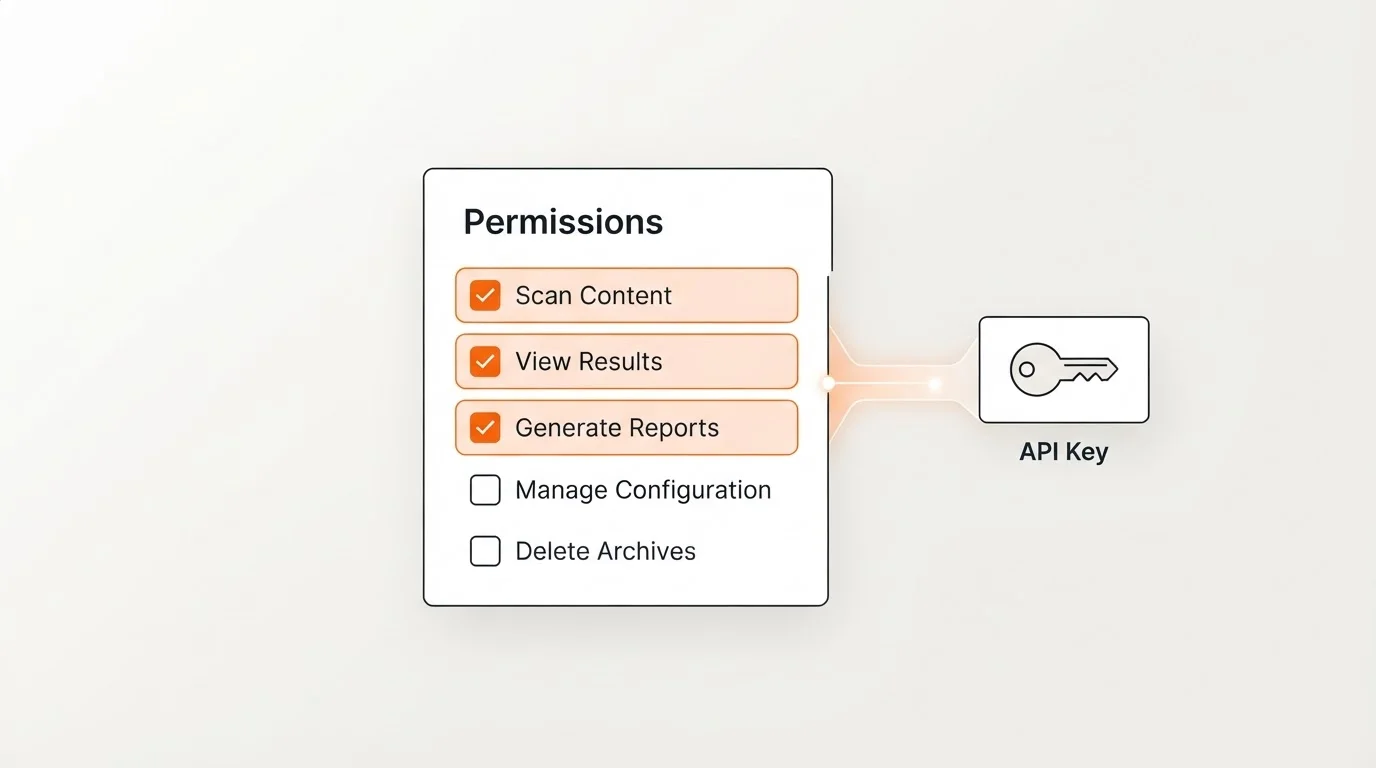
One of the platform's standout technical features is its approach to API security. On Page allows users to create specific API keys in a dashboard and define granular permissions for each integration. This 'least privilege' approach ensures that a specific token is only granted the permissions it needs to execute a request, reducing the attack surface for your sensitive search data.
For SaaS companies with complex internal environments, this level of isolation is a significant advantage. Instead of granting an integration broad access to your SEO environment, you can limit third-party connections to specific tasks. The platform also monitors request timing and performance through standard server logs, ensuring that the API remains responsive during high-volume scanning jobs.
Financial and Billing Integration
Unusually for an SEO-focused tool, On Page includes features for managing financial transactions. The platform allows users to send statements and invoices directly and collect payments within the system. This capability is targeted at agencies or founders managing multiple sub-accounts who need to consolidate their billing cycles.
While this feature removes the need for a separate invoicing tool for SEO-specific services, it is important to note that it does not replace a full-scale accounting system. It is a specialized feature for those who treat SEO as a service-based line item within their organization. For SaaS founders, this might be less critical than the core scanning features, but it offers a unique way to manage cross-departmental SEO costs.
Evaluating Product Fit for SaaS Founders
Product fit for On Page depends largely on your content volume and your team's technical expertise. The platform is structured around credit usage, which dictates how many scans and optimizations you can perform. Plans are typically tiered into Starter, Growth, and Scale levels, with each tier offering a progressively higher volume of monthly credits for scanning and API access.
When evaluating these tiers, consider the management cost alongside the subscription. Because On Page is a toolkit, your team must still spend time reviewing the scans and applying the suggested optimizations. The Starter tier is best for early-stage testing, while the Growth and Scale plans are intended for teams managing hundreds of pages that require frequent technical auditing to maintain their search presence.
Get practical updates on On Page features and product fit
Receive new articles and practical insights by email.
The Strategic Alternative: Autopilot for SaaS Growth
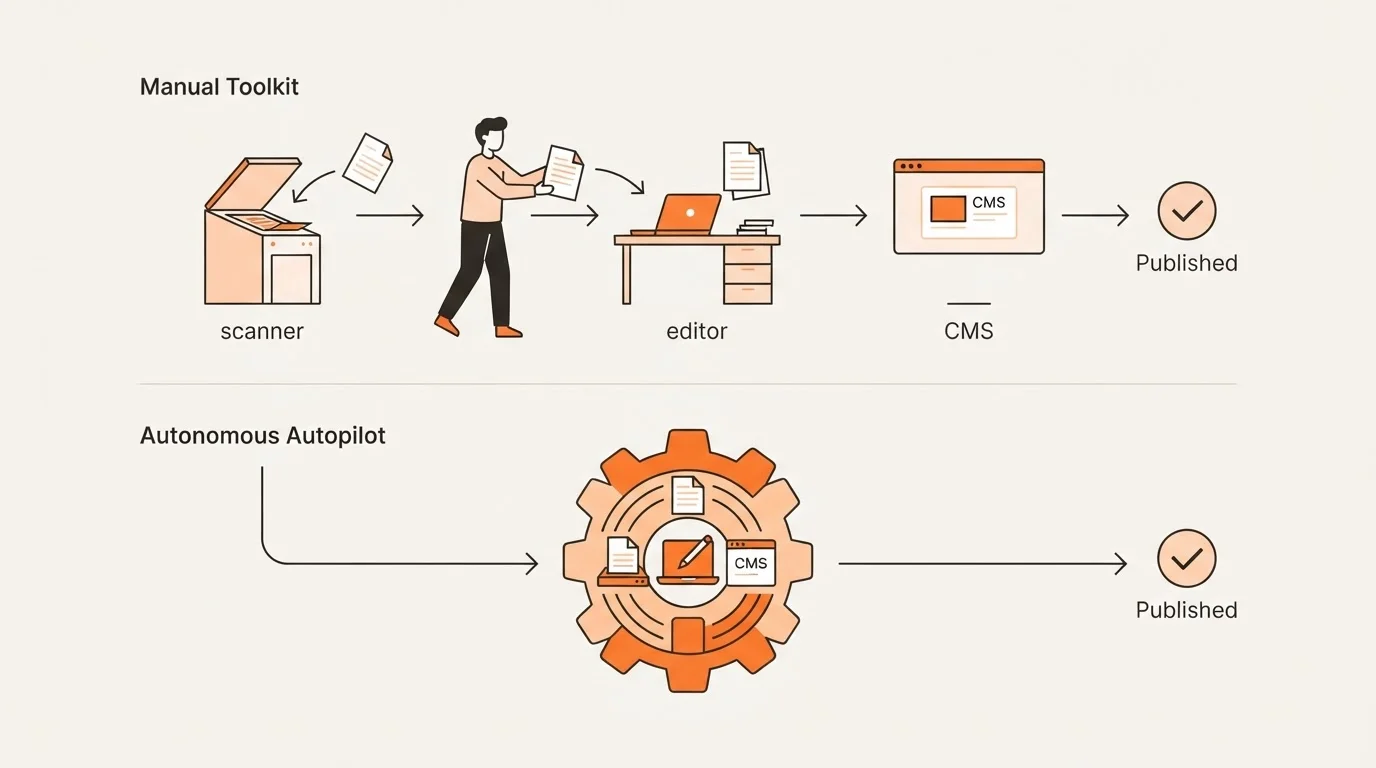
While On Page is excellent for founders who want to manage every scan and optimization, many SaaS leaders find that managing content queues still takes too much time away from product development. This is where the distinction between a 'toolkit' and an 'autonomous platform' becomes clear. If your goal is to have a high-performing blog that generates organic growth without requiring you to manage review queues, an autonomous solution like Blogged is the natural evolution.
Blogged handles the entire lifecycle—research, planning, writing, SEO, GEO (Generative Engine Optimization), and internal linking—and publishes directly to your site. It transforms your product knowledge into discoverable content while you focus on building your SaaS. For founders who cannot spare five to ten hours a week to manage an SEO toolkit, moving to a platform that runs on Autopilot provides a better return on time invested.
Feature Comparison: Toolkit vs. Autonomous
| Capability | On Page (Toolkit) | Blogged (Autonomous) |
|---|---|---|
| Primary Role | Technical SEO Data Engine | End-to-End Growth Engine |
| Content Creation | Scans & Optimization Suggestions | Autonomous Research & Writing |
| Workflow | Human-in-the-Loop Review Queue | Fully Autonomous Autopilot |
| Search Focus | Technical On-Page SEO | SEO + Generative Engine (GEO) |
| Publishing | Manual/API Export | Native Automated Publishing |
Frequently Asked Questions
Q: Does On Page store the content I submit for analysis?
According to their privacy policy, content submitted for analysis is processed in real-time. It is not stored beyond the duration of the request, except for cached results which are retained for up to 24 hours to improve performance.
Q: How do credits work in On Page?
Credits are the internal currency for the platform. Different actions, such as running a scan or using specific API endpoints, consume a set number of credits based on the plan you select.
Q: Can I automate the content review process entirely?
You can automate the creation of the review queue, but the platform is designed for a human-in-the-loop workflow where an editor reviews the AI-generated scans and optimization suggestions before they go live.
On Page offers a powerful, API-first approach to SEO that is well-suited for teams needing granular control and secure integrations. Its ability to automate the scanning-to-queue workflow provides a significant efficiency boost over manual auditing. However, for founders who want to completely outsource the research and publishing process to focus on their core product, an autonomous engine like Blogged is the superior choice for driving product-led growth.