
On this page
For SaaS founders, organic search is often the most sustainable engine for long-term customer acquisition. However, in an increasingly competitive search environment, high-quality content alone is no longer enough to win. Google now places significant weight on how users actually experience your pages. Core Web Vitals (CWV) are the standardized metrics Google uses to quantify this experience, specifically focusing on loading speed, visual stability, and responsiveness.
Ignoring these technical signals can actively suppress your rankings, regardless of how well-written your blog posts are. In a high-stakes SaaS environment where a single second of delay can lead to a drop in engagement, technical health is a prerequisite for organic growth. This guide details the specific performance pillars every founder must understand to transform site health into a competitive advantage.
The Evolution of Performance: Why Core Web Vitals Matter
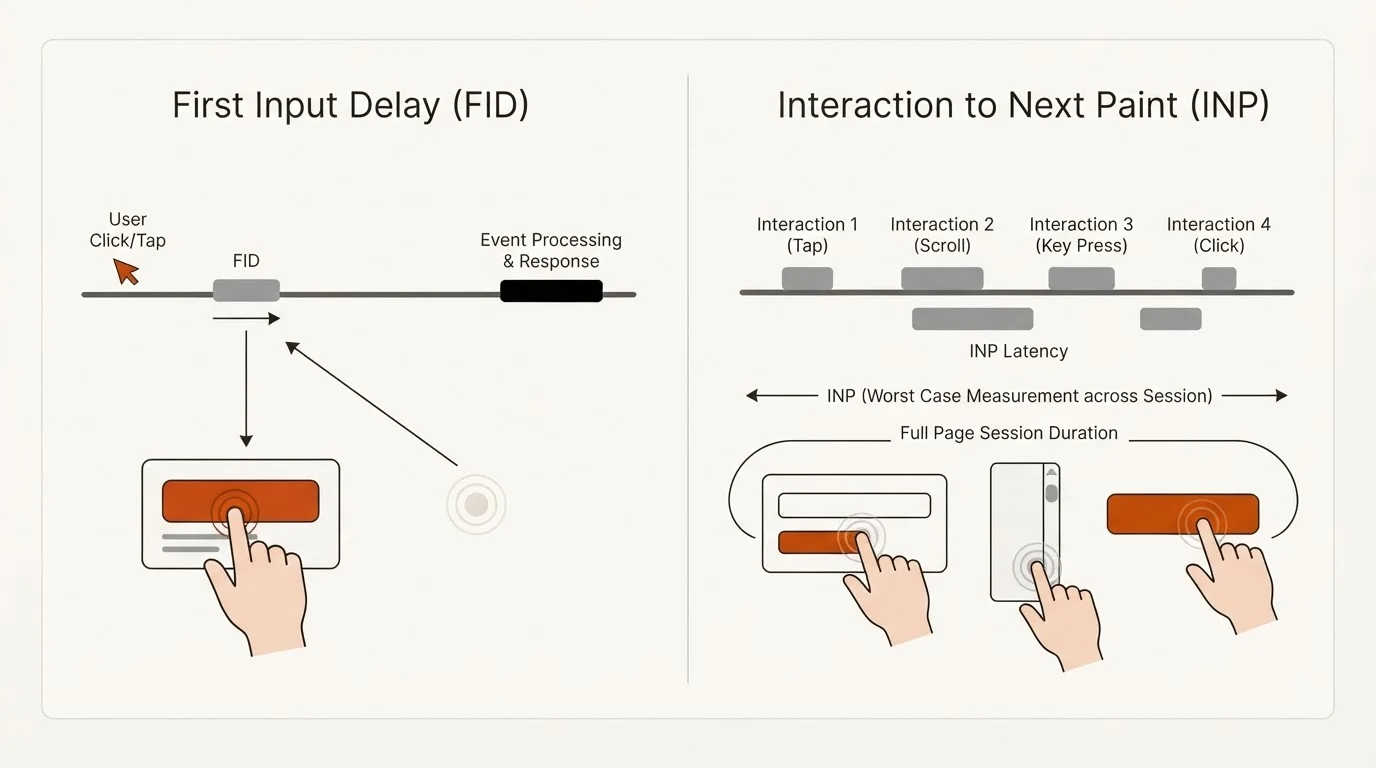
Core Web Vitals are a set of metrics that measure real-world user experience for loading performance, interactivity, and visual stability. While Google uses a wide array of signals to rank content, Core Web Vitals serve as a direct indicator of page experience. As of March 12, 2024, Google officially replaced First Input Delay (FID) with Interaction to Next Paint (INP) as the primary interactivity metric. This change reflects a broader shift toward measuring responsiveness throughout the entire duration of a user's visit, rather than just the first click.
For SaaS businesses, passing these thresholds is about more than just SEO; it is about building trust. A fast, stable site acts as a silent sales representative, signaling that your product is reliable and professionally managed. When your blog pages load quickly and respond instantly, you reduce the friction between a prospect’s problem and your product’s solution.
Largest Contentful Paint (LCP): The Loading Pillar
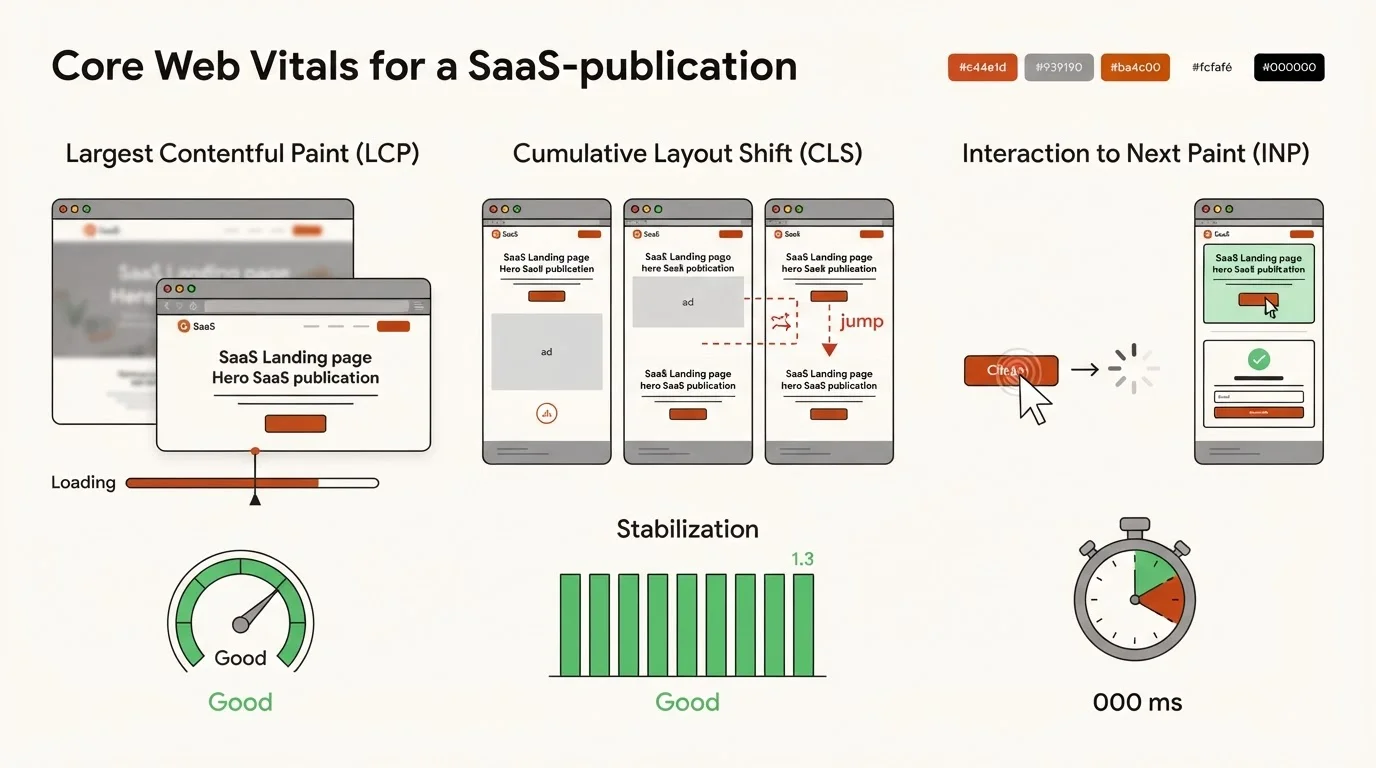
Largest Contentful Paint (LCP) measures how long it takes for the largest piece of content on a page to become visible within the viewport. On a typical SaaS blog or landing page, this is usually a hero image, a primary value proposition headline, or a video thumbnail. To meet Google’s "Good" threshold, your LCP should be 2.5 seconds or less.
Slow LCP scores in SaaS are frequently caused by large, unoptimized product screenshots or render-blocking JavaScript that prevents the browser from displaying content until the scripts have loaded. Improving LCP requires a focus on the "critical rendering path." This includes using modern image formats like WebP or AVIF, utilizing Content Delivery Networks (CDNs) to reduce server response times, and preloading your most important assets.
Automation can help maintain these standards. For instance, Blogged's private SaaS product asset library allows founders to manage screenshots with automated alt text and optimized delivery, ensuring that even as you scale your content production, your images don't become a bottleneck for performance.
Cumulative Layout Shift (CLS): The Visual Stability Pillar

Cumulative Layout Shift (CLS) quantifies how much elements on a page move around while the page is loading. We have all experienced the frustration of trying to click a button, only for a late-loading image or banner to push the button down, causing a misclick. For a SaaS site, this can mean a user accidentally clicking away from a signup form or a pricing table. A "Good" CLS score is 0.1 or less.
Common causes of high CLS in SaaS sites include:
- Images without dimensions: If the browser doesn't know the width and height of an image before it loads, it cannot reserve space for it.
- Dynamically injected content: Chat widgets, cookie banners, or promotional pop-ups that appear without pre-allocated space.
- Web fonts: FOIT (Flash of Invisible Text) or FOUT (Flash of Unstyled Text) can cause text to shift when the custom font finally renders.
To fix these issues, ensure all media elements have explicit width and height attributes in the HTML and use CSS aspect-ratio properties. For dynamic content, use "placeholders" or skeleton screens that reserve the necessary space in the layout before the element is fully rendered.
Interaction to Next Paint (INP): The Interactivity Pillar
The newest Core Web Vital, INP, measures the latency of all interactions a user makes with a page—such as clicking a button, tapping a link, or interacting with a menu. Unlike the metric it replaced, which only looked at the very first interaction, INP provides a holistic view of responsiveness during the entire session. A "Good" INP score is 200 milliseconds or less.
In the context of a SaaS blog, high INP is often the result of "heavy" pages where the browser's main thread is busy processing long JavaScript tasks. This is particularly common on pages with complex calculators, interactive demos, or heavy tracking scripts. To improve INP, developers should focus on breaking up long tasks into smaller chunks and deferring non-essential scripts—like third-party analytics or support widgets—until after the page has become interactive.
Essential Tools for Monitoring SaaS Performance
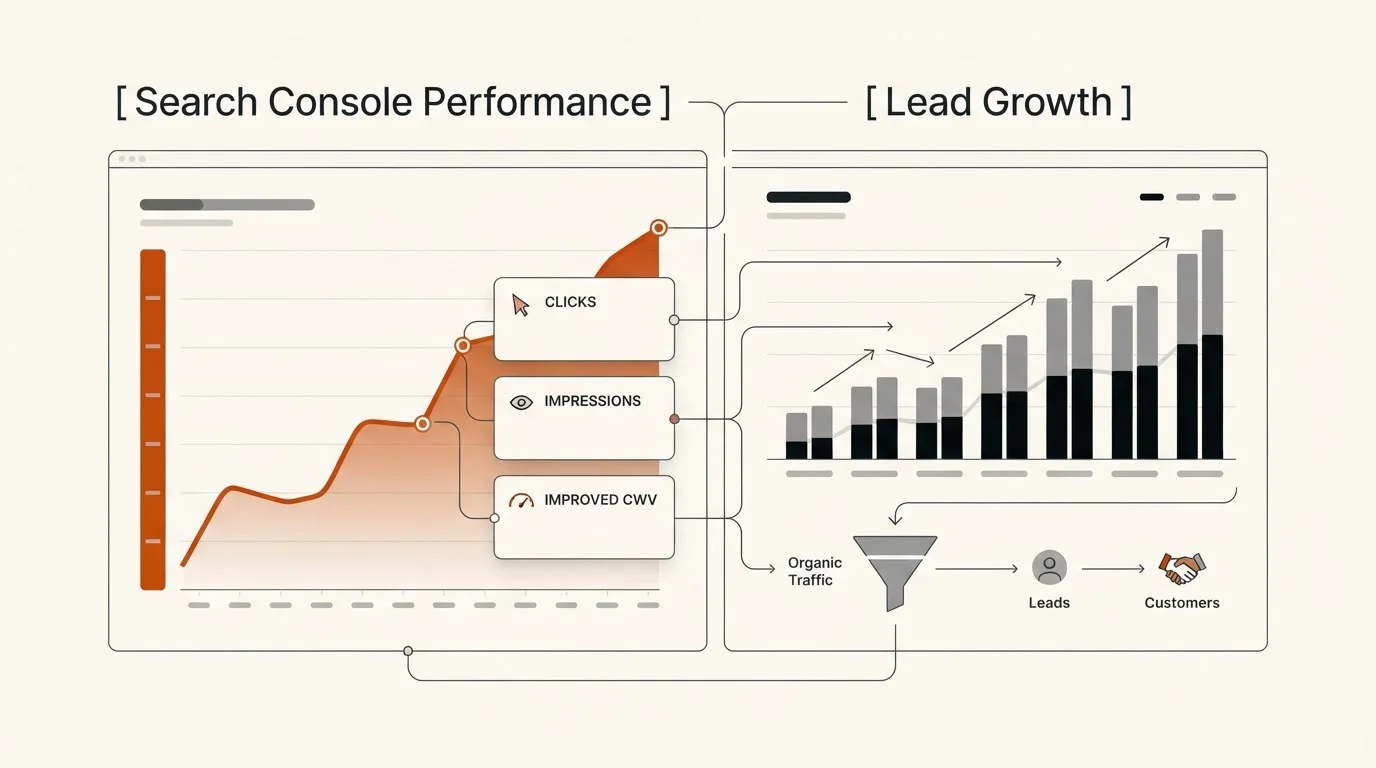
You cannot optimize what you do not measure. SaaS founders should leverage three primary tools to audit and maintain their site performance:
- Google Search Console (Core Web Vitals Report): This is the most important tool because it provides field data—information collected from real Chrome users. It groups your URLs into "Poor," "Need Improvement," and "Good," allowing you to identify site-wide patterns.
- PageSpeed Insights (PSI): PSI provides a deep dive into specific URLs, offering both field data and "lab data" (simulated tests). It also generates a prioritized list of technical fixes for LCP and INP.
- Chrome DevTools: The "Performance" and "Rendering" tabs allow your technical team to see frame-by-frame recordings of layout shifts and identify specific scripts that are blocking the main thread.
Platforms like Blogged allow users to track Search Console performance and lead outcomes directly within their dashboard. By integrating these metrics into your content workflow, you can see exactly how technical improvements impact organic reach and conversion rates without jumping between different tools.
Integrating Performance into Your Growth Strategy
Performance is not a one-time project; it is a requirement for scaling. As your SaaS blog grows, the complexity of managing technical SEO increases. Manually optimizing every image and checking every new script for layout shifts becomes unsustainable for a small team focusing on product development.
Automation provides a solution to this scaling challenge. Blogged’s Autonomous Blog Publishing for SaaS automates the content loop, ensuring that every published piece follows strict technical standards. By handling the research, writing, and optimization automatically, the platform ensures your blog remains fast and compliant with Core Web Vitals.
Furthermore, Blogged's Knowledge Engine organizes product, competitor, and keyword data into verified facts. This structured approach prevents "content bloat"—the accumulation of unnecessary code and media that often degrades performance in manually managed blogs. When your technical foundation is automated, you can focus on building your product while your organic growth engine runs on autopilot.
Frequently Asked Questions About Core Web Vitals
Q: Can I still rank if I fail one of the Core Web Vitals?
Yes. Google uses many signals to determine rankings, and high-quality, relevant content remains the most important factor. However, Core Web Vitals act as a tie-breaker. If two pages have equally good content, the one with better performance will likely rank higher.
Q: How long does it take for Search Console to reflect my performance fixes?
Google Search Console uses a 28-day rolling window of data. After you deploy a fix, it can take up to a month for the report to fully update and show your URLs as "Good."
Q: Does a faster hosting provider fix all my CWV issues?
A faster host primarily helps with Largest Contentful Paint (LCP) by improving server response times. It will not fix Cumulative Layout Shift (CLS) or Interaction to Next Paint (INP), as those are determined by your site's code and asset structure.
Mastering Core Web Vitals is a fundamental requirement for SaaS founders who want to secure a dominant position in organic search. By maintaining a fast Largest Contentful Paint, stable layout shifts, and responsive interactions, you create a digital environment that both Google and your users will reward.
Start by auditing your site in Google Search Console to identify your highest-impact performance gaps. As you scale your content, consider leveraging autonomous platforms like Blogged to ensure your organic growth is built on a high-performance foundation. In the competitive SaaS market, speed and stability are not just technical details—they are pillars of your growth strategy.