
On this page
Content workflow automation is the process of using technology to manage the repetitive stages of the content lifecycle. For SaaS founders, manual content creation is often the primary bottleneck preventing scalable organic growth. When you are focused on shipping features, maintaining a blog that generates leads feels like a second full-time job. By implementing automated workflows, you can transform your product knowledge into discoverable content without sacrificing your focus on the core product.
The SaaS Content Bottleneck: Why Manual Workflows Stall Growth
Most SaaS startups follow a fragmented content process that relies on human intervention at every step. This usually involves a founder or lone marketer manually researching keywords, drafting in a document, and emailing stakeholders for technical accuracy. This manual hand-off is where momentum dies. When content production stalls, publishing frequency drops, and organic growth plateaus. Content workflow automation builds a repeatable system that ensures your blog continues to work for you, even during intense development sprints.
1. Centralize Your Product Knowledge Engine
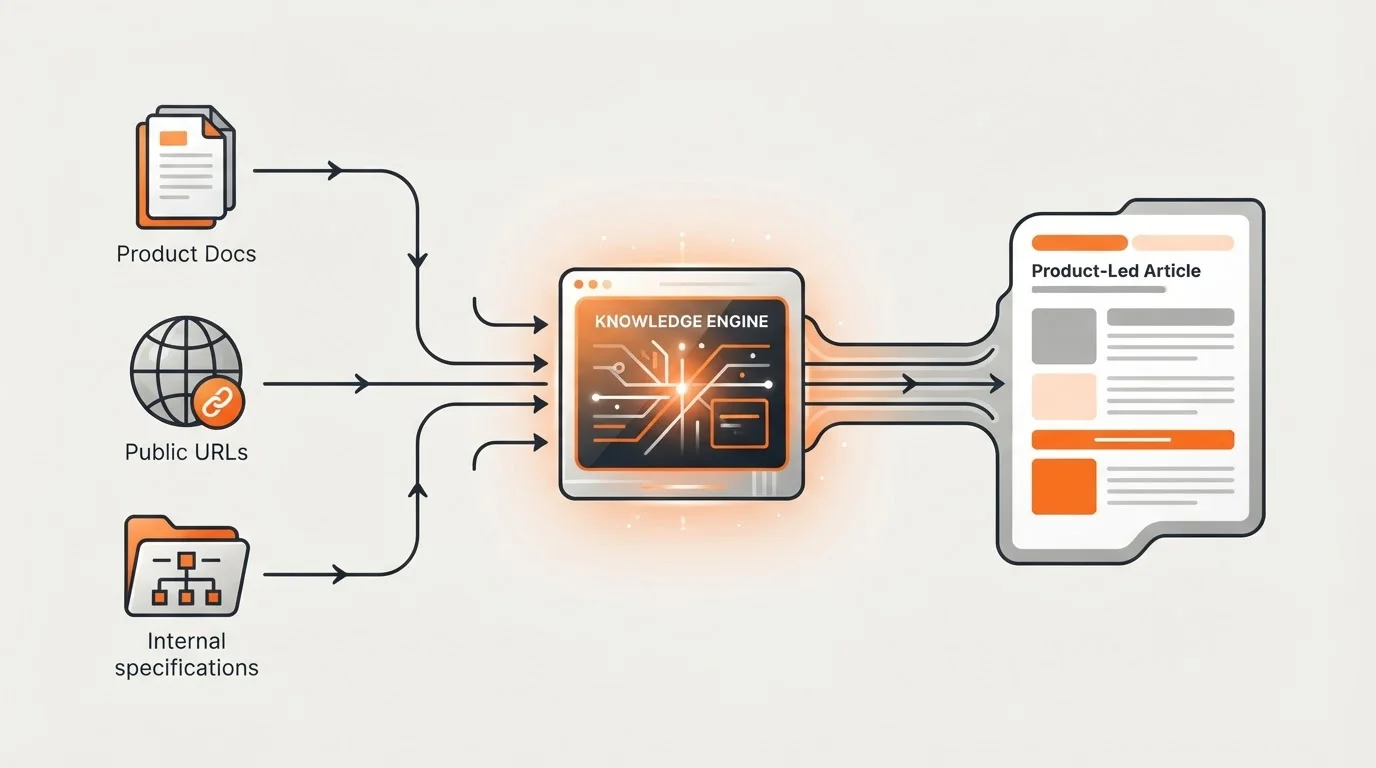
The most time-consuming part of SaaS content is ensuring the writer understands the product. Instead of briefing writers for every new post, centralize your technical documentation, public URLs, and internal specs into a single source of truth. Platforms like Blogged use a specialized Knowledge Engine that can ingest public product sources, uploaded documents, or pasted links. This ensures that every piece of automated content is deeply informed by your product's actual capabilities, reducing the need for heavy technical edits later.
2. Automate Ideation Based on Competitor Gaps
Don't spend hours staring at a blank calendar trying to guess what your audience wants. Use automation to identify what your competitors are writing about and where their content falls short. Automated research tools can scan search results to find high-intent topics that align with your product's value proposition. By automating the ideation phase, you ensure your content calendar is filled with data-backed topics. This shifts your role from a creator to an editor, which is a much more efficient use of a founder's time.
3. Standardize Briefs with AI-Powered Templates
A weak brief leads to a weak first draft, which leads to more manual work for you. Automate the creation of content briefs to include mandatory SEO requirements, target personas, and specific product features that must be mentioned. When these elements are standardized, the initial quality of the draft improves significantly. Automated brief generation eliminates the back-and-forth communication that occurs when a writer misses a key technical nuance of your SaaS.
4. Deploy Automated SEO and GEO Checks
SEO is no longer just about keyword density; it is about meeting the requirements of Search Generative Experiences (SGE) and Generative Engine Optimization (GEO). Instead of manually checking header structures, use tools that provide real-time optimization scores. Autonomous platforms like Blogged handle research, planning, and SEO optimization as an integrated step. This ensures that every article is technically sound and ready for discovery by both traditional search engines and AI-driven search tools from the moment it is drafted.
5. Use Unlimited Team Seats for Frictionless Review
One of the biggest delays in content production is the approval cycle. If your tools charge per user, you may hesitate to add product managers or developers to the workflow, creating a review bottleneck. Look for platforms that offer unlimited team seats. Blogged includes unlimited team seats on its plans, allowing marketers and product leads to participate in the review and approval process without additional costs. This openness ensures that technical accuracy is verified quickly, moving content from draft to published status faster.
6. Automate Internal Linking for Site Authority
Manually searching your blog for relevant articles to link to is tedious and frequently forgotten. Content workflow automation can handle this by scanning your existing library and automatically inserting relevant internal links into new posts. This improves the reader experience and strengthens your site's SEO architecture. By automating interlinking, you ensure that new product updates are always connected to your foundational pillar content, helping search engines crawl your site more effectively.
7. Integrate Directly with Your CMS
Eliminate the copy-paste stage by using direct integrations between your content platform and your website. If your SaaS site runs on WordPress, Ghost, or Webflow, your automation platform should push the final, formatted article directly to your site as a draft. For example, Blogged offers a WordPress AI Blog Publishing integration that lets you review articles in one place and deliver them to your site with a single click. Similar integrations for Ghost and Webflow ensure that your formatting, images, and metadata remain intact without manual entry.
8. Centralize Your Brand Assets
Hunting for the latest logo, product screenshots, or brand colors slows down production. Store all content assets in a centralized, accessible location that integrates with your content creation tools. When your automation platform has access to a verified library of assets, it can generate visually consistent content that adheres to your brand guidelines. This reduces the time spent on design tweaks and ensures a professional look across every post you publish.
9. Monitor Performance with Automated Dashboards
Your workflow isn't finished once a post is published. Automate the tracking of key metrics like Search Console performance, lead growth, and reader feedback. Instead of manually pulling reports, use a dashboard that aggregates engagement data and CTA outcomes. By tracking these metrics automatically, you can quickly identify which product-led topics are driving the most conversions and adjust your automated content strategy accordingly without manual data entry.
10. Iteratively Refine Your Autopilot Settings
Automation is not a set-it-and-forget-it solution; it is a system that requires periodic optimization. Regularly review your automated workflows to identify new bottlenecks. Perhaps your review cycle is still too long, or your knowledge engine needs more recent product updates. Schedule quarterly reviews of your content performance and workflow efficiency. As your SaaS evolves, your automation settings should evolve with it to ensure your content remains as cutting-edge as your product.
Measuring the Impact of Workflow Automation
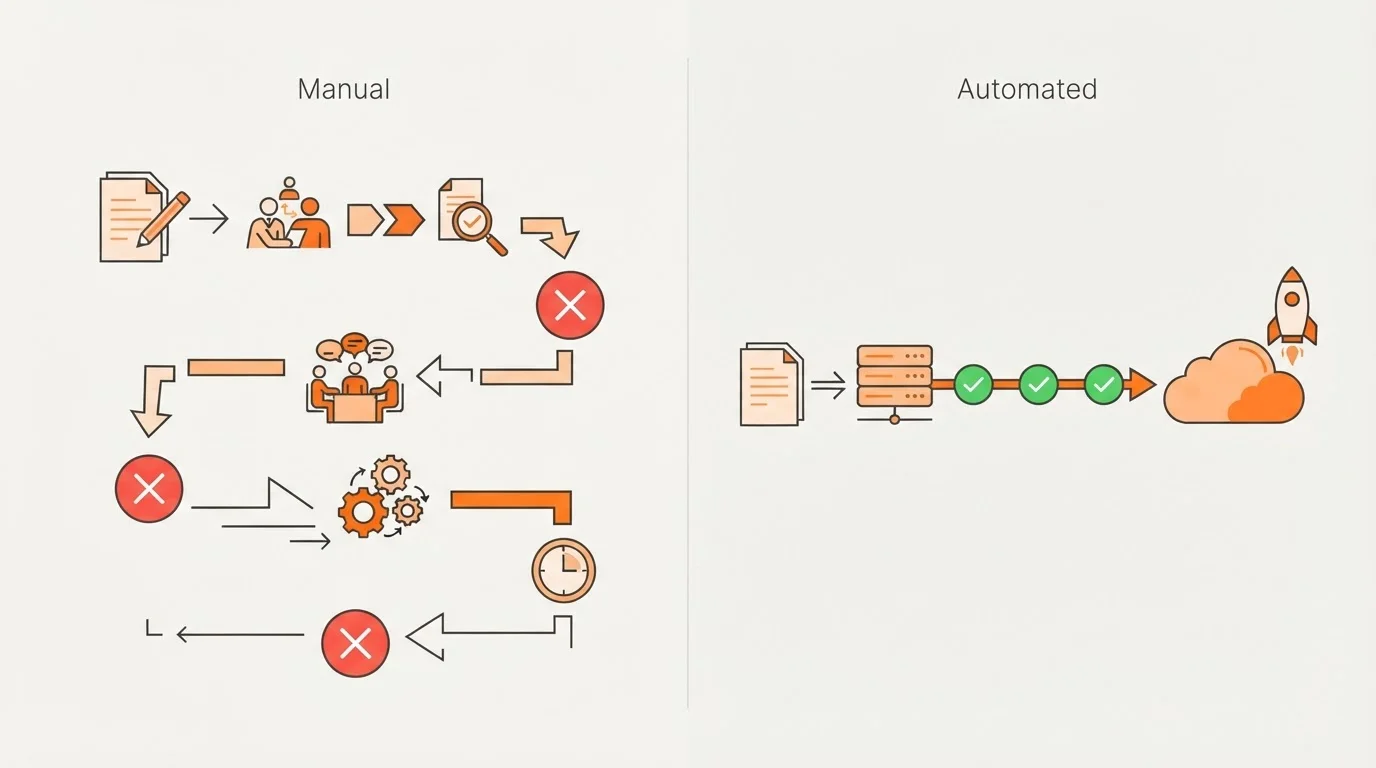
To justify the investment in automation, track the specific time and resources you save. Compare the average time it takes to move an article from idea to live before and after implementing these tips. Most founders find that by moving to an autonomous system, they can sustain high-quality publishing every week while focusing entirely on building their company. With Blogged starting at $99 per month, the cost of automation is often significantly lower than hiring a dedicated content manager or agency to handle the same volume of work.
Frequently Asked Questions
Q: Can automation handle technical SaaS topics accurately?
Yes, provided you use a platform with a knowledge engine. By feeding the system your actual product documentation and specifications, the automation can produce content that is technically accurate and product-led.
Q: Does automated publishing hurt SEO?
No, as long as the content is useful and specific. Search engines reward high-quality, relevant content regardless of whether the workflow was automated. Using tools that handle SEO and GEO optimization helps ensure the content meets modern search standards.
Q: How much time can I really save?
By automating research, SEO, and publishing, founders can shift from being primary writers to high-level editors. This significantly reduces the manual hours required to maintain a consistent publishing schedule.
Get practical updates on content workflow automation
Receive new articles and practical insights by email.
Achieving Content Efficiency on Autopilot
For SaaS founders, time is the most valuable resource. Content workflow automation allows you to maintain a high-impact blog that drives organic growth without the manual overhead. By centralizing your product knowledge, using direct CMS integrations, and leveraging autonomous platforms like Blogged, you can turn your expertise into a discoverable asset. Start small by automating your most significant bottleneck, and then scale your operations to achieve a truly hands-off content engine.